
Model Context Protocol (MCP) is an open standard (originally from Anthropic) that lets AI agents connect to real business data systems. Microsoft has now built an MCP server for D365 FO apps and it’s a big deal for anyone building AI agents on top of D365 FO.
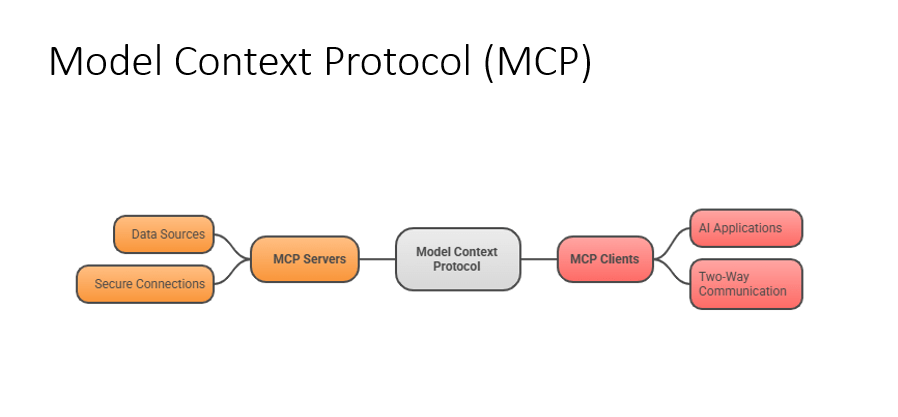
MCP Server – The server which holds all the tools
MCP Clients – The agent or app that uses
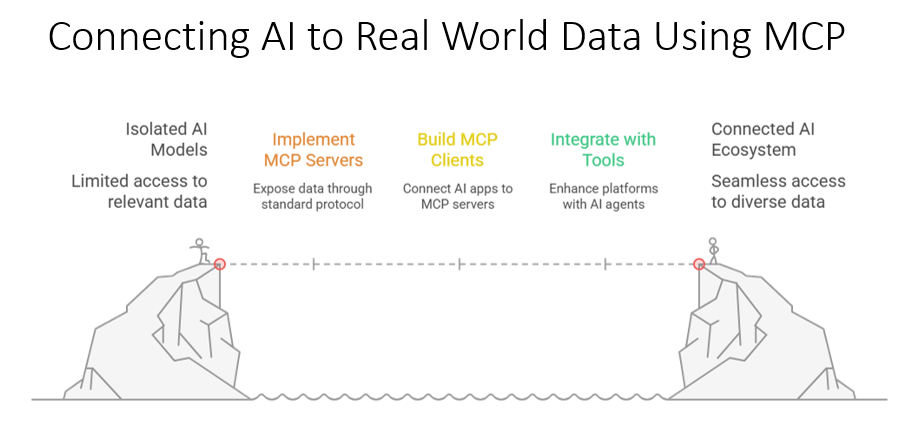
Left cliff = Isolated AI Your AI model is stuck. It’s smart, but it can only see what it already knows. No live business data, no ERP records, no real-world context. It’s shouting across a canyon.
Right cliff = Connected AI Ecosystem On the other side is the promised land — an AI that has seamless access to diverse, real, live data from your business systems. It can actually do things, not just answer general questions.
The bridge = MCP in three steps
The dotted line crossing the canyon has three stepping stones:
| Step | What it means |
|---|---|
| 🟠 Implement MCP Servers | You expose your data (like D365 FO) through the standard MCP protocol you’re building your side of the bridge |
| 🟡 Build MCP Clients | You build or use AI apps (like Copilot Studio agents) that know how to connect to those servers the bridge meets in the middle |
| 🟢 Integrate with Tools | Your AI agent now plugs into platforms and enhances them the bridge is complete and traffic flows |
Please have a look at one video of MCP in action with D365 FO. This shows how you can create D365 FO Purchase order with the help of MCP.
Thanks for reading this blog and watching the video let’s meet with another blog soon !

 d365bits.com