
In the evolving landscape of Microsoft Business Applications, virtual entities serve as a powerful bridge between Dynamics 365 Finance & Operations (D365 F&O) and Microsoft Power Platform. Think of them as a window that allows you to view and manipulate D365 F&O data directly through Dataverse, without the need for data duplication or complex synchronization processes.

Let’s dive deeper into virtual entities and learn more about it and look at one of the common questions we get while explaining Virtual entity concept…
What is a virtual entity (table), and how does it differ from a regular table in Dataverse?
Definition and Purpose:
- Virtual entities enable full CRUD (Create, Read, Update, Delete) operations between Dataverse/Microsoft Power Platform and D365 FO
- Data remains in D365 FO while being accessible through Dataverse
- All OData entities in D365 FO are available as virtual entities in Dataverse
Virtual Entity (Table)
- Acts as a “window” to view and interact with data that physically resides in an external system (like D365 F&O)
- No data is stored in Dataverse itself
- Data operations (create, read, update, delete) are performed directly on the source system
- Changes are reflected in real-time since you’re working with the actual source data
- Requires a connection to the source system to access data
- Uses OData protocol for communication with D365 F&O
Regular Table in Dataverse:
- Data is physically stored within Dataverse
- Operations are performed directly on Dataverse data storage
- Can work offline since data is stored locally
- Takes up storage space in Dataverse
Note : Virtual tables, also known as virtual entities
Key Architecture Components
- Implements six primary methods: Create, Update, Delete, Retrieve, RetrieveMultiple, and PerformAction
- Uses SSL/TLS 1.2 secure web calls between systems
- Two-point translation process:
- VE Plugin translates entity names and concepts
- CDSVirtualEntityAdapterService converts queries to D365 FO format

Security and Authorization
- Uses service-to-service (S2S) calls with Microsoft Entra application
- Requires proper user context and permissions in both systems
- CDSVirtualEntityApplication security role provides necessary base privileges
- User identity from Dataverse is mapped to D365 FO for access control
Best Practices and Considerations
- Recommended to co-locate D365 FO and Dataverse in same Azure region
- Expected virtual entity overhead less than 30ms per call when co-located
- Power Apps Portal access requires specific user mapping and security roles
- Anonymous portal access is supported with proper configuration
Some of the benefits of using Virtual entities
- Enables direct data access for D365 FO data without copying to Dataverse
- Maintains business logic enforcement through D365 FO
- Facilitates building external facing websites through Power Apps portals
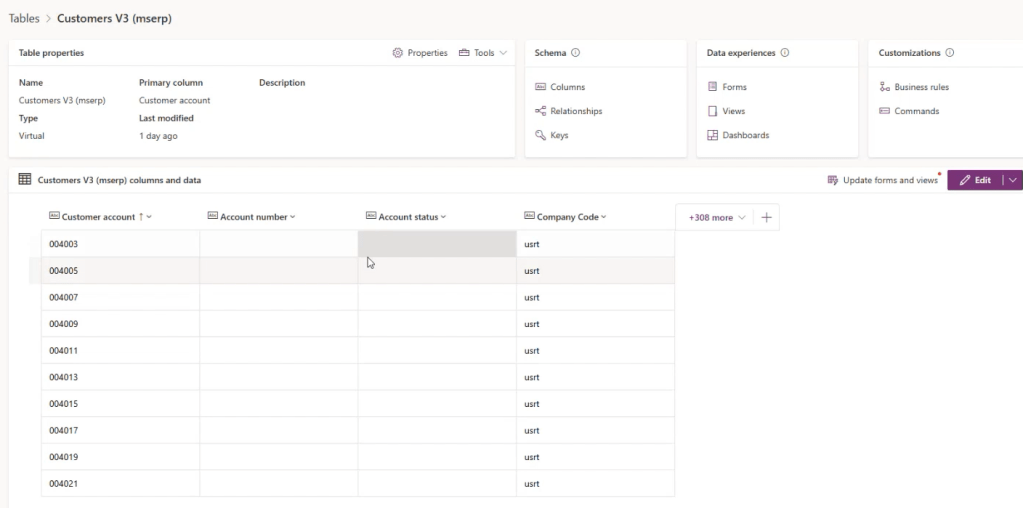
Example of Customer V3 virtual entity is shown below in the image.
Please check the below video which would contain all the explanations in details and summary of the video and what it will cover is mentioned below.
Virtual Entities in Dynamics 365: In the below video I have presented on virtual entities in Dynamics 365 Finance and Operations, explaining their architecture, setup, and use for CRUD operations without data duplication.
Enabling and Viewing Virtual Entities: I have also demonstrated how to enable and view virtual entities in Dynamics 365 and Power Platform, and how to create and refresh them automatically.
Demo of Virtual Entities: Also conducted a demo showing the creation, reading, updating, and deletion of records using virtual entities using a Canvas app.
Official Microsoft documentation used for the above blog.
Note : These documents may change in future so please refer to official documents if there is any change.
Thanks for reading this blog and watching the video let’s meet with another blog soon !

 d365bits.com