
Microsoft now offers free subscription-based trial environments for finance and operations apps, including Dynamics 365 Finance, Supply Chain Management, Project Operations, and Commerce, enhancing the experience for administrators, partners, and ISVs.

Finance and operations apps can now be managed in Power Platform’s admin center, allowing users to manage their environments, policies, licensing, and capacity. This unification allows multiple Dynamics 365 applications and Power Platform apps to be installed and hosted in the same environment.
To deploy finance and operations apps in Power Platform, you need a license assigned by your license administrator, such as Dynamics 365 Finance or Dynamics 365 Supply Chain Management, and at least 1 gigabyte of available Operations and Dataverse database capacities.
- Go to Microsoft 365 admin center and then click details and then click start free trial


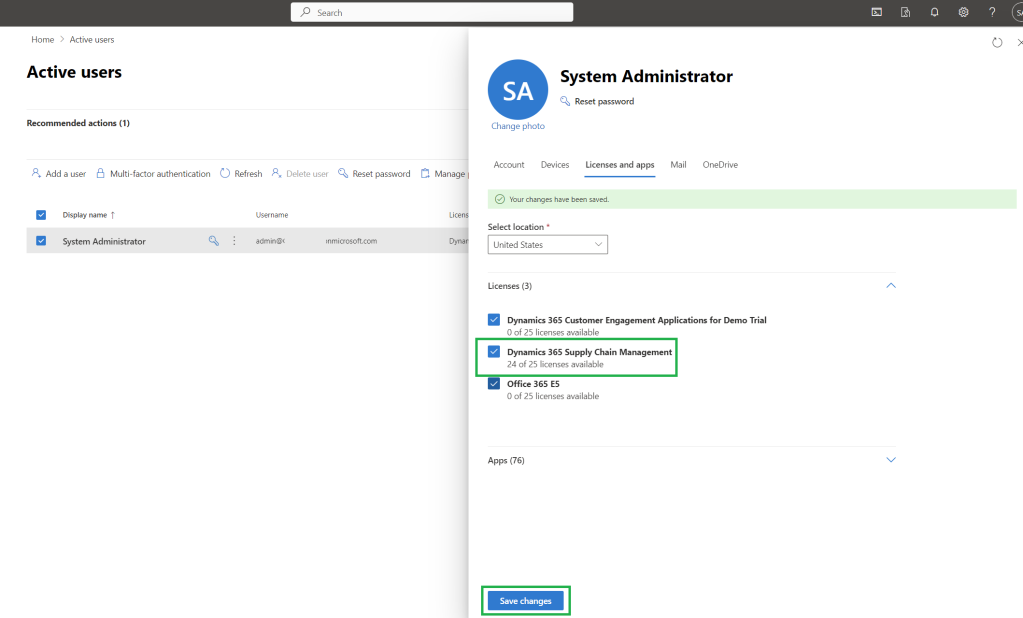
2. Go to active users from Microsoft 365 admin center and select the user which you want to assign the D365 SCM license and then select the D365 SCM license
3. Enter environment name > select the region > Select the type as “Trial (Subscription-based)” > click next

4. select the security group > Enable Dynamics 365 apps
Select automatically deploy these apps and select “Supply Chain Management (Preview)”

Then click save.

5. Once completed you will be able to see under the environments the newly created D365 SCM environment

After the deployment complete we can see that both environment for Dataverse and D365 FO is created.

When click the finance and operations URL we can access the newly created D365 SCM environment.

Also that the new D365 CE environment is created and linked.

Same steps you can use to create D365 Finance by selecting the D365 Finance trial license.
Read more about this using this link.
Thanks for reading this blog post. Will meet you again with the next post.

 d365bits.com